

Uncensored AI isn’t just about NSFW content. Tools like Eternal AI remove restrictive filters so artists, designers, and storytellers can push ideas further. In this guide, we’ll dive deep into what uncensored AI really is, explore real examples from Eternal AI’s text-to-video and image editing features, and break down how to craft cinematic prompts that bring imagination to life.
1. What Is Uncensored AI and Why It Matters
1.1. The Problem With Filtered AI
Most mainstream AI platforms operate inside a safety cage. They detect “sensitive” words, body parts, emotions, violence, political symbols and instantly reject the prompt. This makes sense for public safety, but for artists it’s frustrating.
A photographer can’t study anatomy, a filmmaker can’t explore darker moods, a game designer can’t depict realistic battle scenes. The result is creativity under surveillance, beautiful, but limited.
1.2. The Idea of Uncensored AI
Uncensored AI removes those artificial barriers. Technically, it’s the same model but without the corporate moderation layer that blocks creative themes.
It gives you:
- Full control over the language you use in prompts
- Access to realistic textures, motion, and lighting
- The ability to experiment with mature, fantasy, or controversial aesthetics responsibly
The goal isn’t chaos. It’s authenticity, letting creators decide what is art, instead of an automated filter.
1.3. Why Creators Are Embracing It
Artists, filmmakers, and indie developers use uncensored AI because it allows:
- Realism: lighting, anatomy, and materials look human, not airbrushed.
- Expression: complex emotion, body language, or dark tones can exist.
- Exploration: niche genres like gothic, cyberpunk, mythic, avant-garde – no longer trigger warnings.
As one Eternal AI community member put it, “It feels like having the camera back in my hands.”
2. Real Examples From Eternal AI
Eternal AI has become the reference point for practical uncensored generation.
Its ecosystem covers text-to-video, image-to-video, and image editing, all running without censorship blocks yet under ethical guidelines.
2.1. Text → Video: From Words to Motion
One of the simplest ways to explore Eternal AI is through text-to-video generation — where a single line of description becomes a moving, cinematic scene.
Example Prompt:
An Asian model wearing a stylish fantasy-inspired swimsuit with bunny-ear accessories, posing in a soft studio light. She moves gracefully, smiles subtly, and adjusts her outfit. The atmosphere is elegant and cinematic.
From this prompt, Eternal AI creates a short fashion-style motion clip that feels natural — smooth gestures, gentle camera transitions, and balanced lighting that matches a real photo studio. Every detail of the prompt is reflected in motion: the soft elegance, the confident pose, the subtle smile.
This kind of generation shows how uncensored AI expands creative possibilities. You can describe fashion, fantasy, or sensual concepts freely — without filters flattening the tone or censoring harmless aesthetic elements. It’s not about NSFW; it’s about precision, tone, and artistic control.
With a few words, you can direct a scene that feels like a cinematic editorial — expressive, beautiful, and real.

The result: Uncensored AI: Real Examples and Prompt Tips for Creators
2.2. Text → Video: Dancing in Motion
Another example of Eternal AI’s uncensored text-to-video ability shows how a simple line of description can become a cinematic, story-driven scene.
Example Prompt:
a blonde girl wearing a nurse costume, dancing and having fun at a Halloween party
From this single sentence, Eternal AI generates a short, lively clip. The scene bursts with color, glowing pumpkins in the background, warm golden lights, and playful motion. The girl moves freely across the frame, her outfit flowing naturally as the camera follows her rhythm. Nothing feels artificial or forced; it’s the kind of realism that comes from an unfiltered model interpreting movement and emotion together.
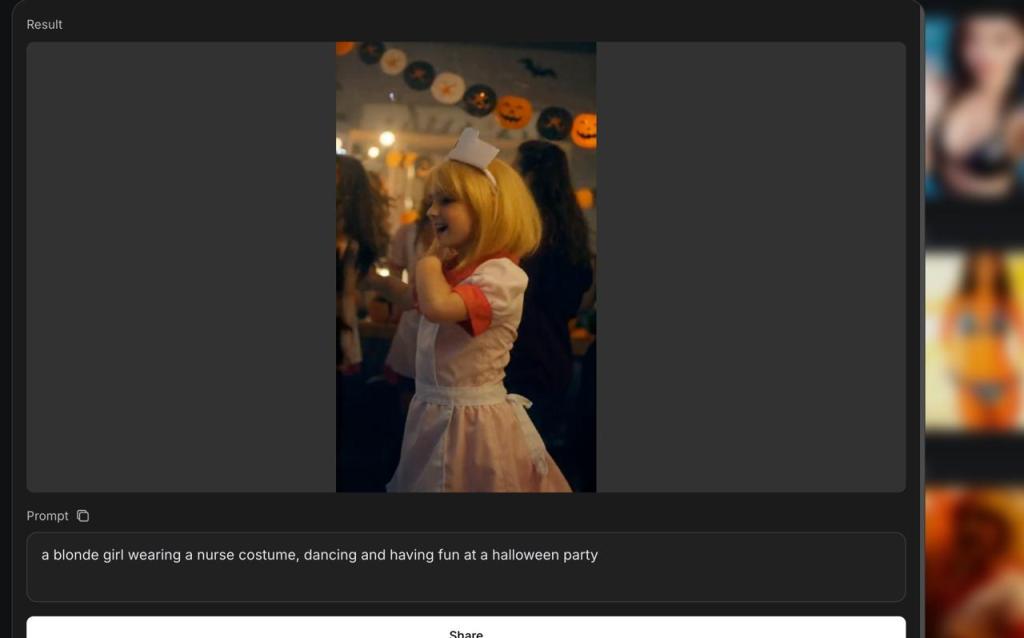
This is where the “uncensored” element truly shines. The model doesn’t hesitate to render costumes, dynamic poses, or festive expressions — details that mainstream tools might block under “sensitive” or “contextual” filters. Here, everything is treated as creative intent.
Text-to-video generation like this opens up possibilities for visual storytelling, music videos, and short-form content where human emotion drives the narrative. A few lines of text can set an entire mood, blending costume, atmosphere, and motion into a vivid moment that feels spontaneous and real.
Read more: Eternal AI: The Future of Uncensored, Unlimited Artificial Intelligence
2.3. Style Transfer and Visual Editing
Eternal AI isn’t limited to generation; it can reinterpret an existing image.
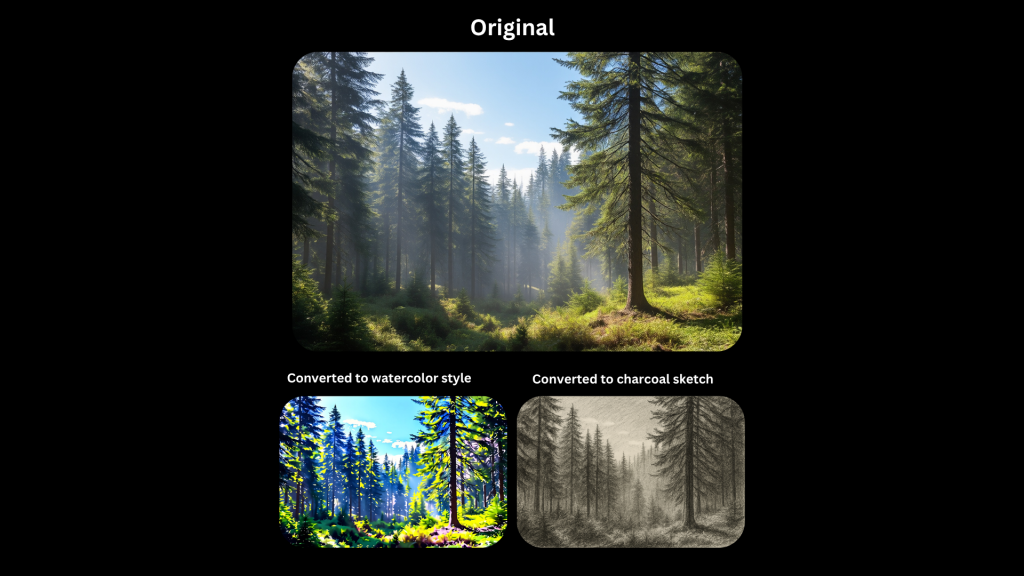
On its official page, they show a pine forest scene converted into multiple styles:
- Watercolor Style: vivid brushwork and saturated light
- Charcoal Sketch: monochrome shading, rough texture
Prompt Example:
“Convert to impressionist style inspired by Monet. Soft brushstrokes. Keep layout and lighting.”
Here, “uncensored” simply means no style limitations. You can reference artists freely, combine mediums, or simulate any historical aesthetic.
2.4. Targeted Edits With Visual Cues
Traditional AI editors often rebuild the whole image when you request a change. Eternal AI understands spatial cues.
Prompt Example:
“Add red balloons inside the box.”
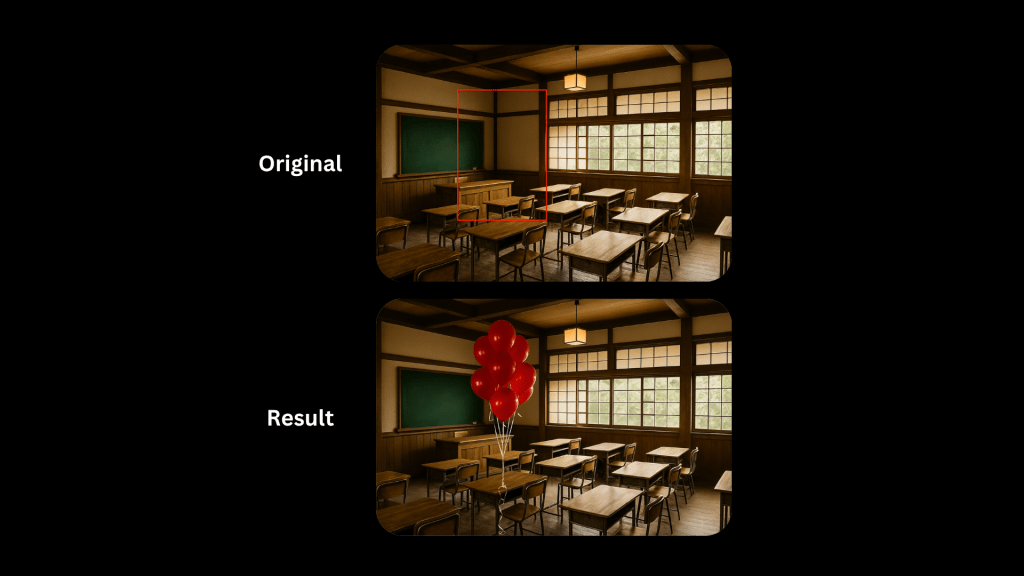
By drawing or marking a focus zone, you guide the model to modify only that area.
This enables surgical precision, perfect for product mock-ups or environment storytelling.
3. How To Write Better Prompts for Uncensored Generation
Writing prompts for uncensored AI is like directing a scene, the model follows your tone, detail, and rhythm. The key is to be clear but expressive: describe not only what you see, but how it feels. A good structure combines subject, action, setting, and emotion, like “a woman walking through neon city rain, cinematic lighting, soft reflections, slow camera motion.” Add specifics, camera angles, lighting, atmosphere and let mood words guide the story. Instead of saying beautiful girl, say a confident woman under soft golden light, wind brushing her hair. The richer the visual and emotional cues, the more lifelike and cinematic your result becomes. Think of your prompt as a short piece of direction, one that tells the AI not just what to show, but why it matters.
4. Final Thoughts
Uncensored AI gives you the power to create anything you imagine, from cinematic scenes to emotional storytelling, from bold fashion to NSFW-style art. It’s not about breaking rules, but reclaiming creative control where censored models fall silent. With tools like Eternal AI, you can explore realism, sensuality, and raw emotion without barriers as long as you create with intent, not impulse.
 Eternal AI
You must be logged in to post a comment.